Cart to Client.
Product planning for professional organizers.
Plan your products. Track your purchases and returns. Send your client a clean invoice.
Without the spreadsheets, the receipt pile, or the 9 pm invoice scramble.
No card required · 14-day free trial
30-minute live demo · Personalized to your workflow
See Cart to Client in action.
A quick tour of the workflow — from product plan to client invoice.
Ready to ditch the spreadsheets?
From client decisions to install day
Your whole project.
Not another spreadsheet.
One place for the products, people, and decisions that turn a plan into a finished space.
A clear plan, from the first product to the final invoice.
Client selections
Get client choices without the email chain.
Share curated product options through a client selection link. Keep decisions connected to the project instead of scattered across messages.
On-site job links
Keep your team moving on install day.
Send your assistants an on-site job link they can open on a phone, without an account login. Track installed items and leftovers as the work happens.
Purchases & returns
Give every leftover a next step.
Keep unused products, purchase records, and returns together. Close out the project with a clear picture of what was used and what needs to go back.
Ready to ditch the spreadsheets?
Storage & Inventory Hub · Pro
Your stored products.
Ready for the next project.
You’ve already bought the bins, baskets, and supplies. Make them easier to find and use. Cart to Client Pro connects your stored inventory, storage locations, and project stock pulls in one place.
Know what you already have
Keep your stored products and stock counts together, so you can check inventory before buying more for a project.
Find it in the right place
Organize inventory by storage location and sub-location. Keep track of products across your office, storage unit, or other supply spaces.
Pull stock for the next project
Create stock pulls from your inventory and prepare a pull list for the products your project needs.
Keep your team’s counts connected
Share stock-counting links with your team and keep a history of inventory updates, instead of collecting counts through separate messages.
Basic includes project inventory and transfers. Pro adds advanced stock tracking, storage locations, and team stock counts.

Professional organizers source products for their clients every day. But no tool was ever built for that specific workflow — until now.
The gap between your product list and your client's invoice finally disappears. No more shoebox of receipts. No more late-night spreadsheets.
Less chasing. More organizing.
Before the scramble.
After Cart to Client.
Ready to ditch the spreadsheets?
From shopping list to client invoice — without the chaos.
Cart to Client keeps every product, purchase, and return in one place so you can close out projects faster and get paid with confidence.

Build your product plan
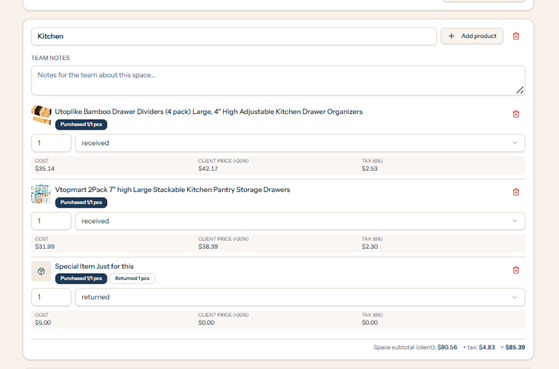
Add products you're sourcing for a client project from any store, any category. Include quantities, links, and costs as you shop. No more spreadsheet juggling.
Track purchases & returns
Mark items as purchased, returned, or swapped as the project unfolds. Cart to Client keeps a running record so nothing slips through the cracks.
Send a clean invoice
Generate a professional client invoice from your tracked items in minutes. Export to send or upload to your CRM — accurate, branded, and ready for payment.
Ready to ditch the spreadsheets?
A clean, professional client invoice.
Every product, every markup, every space — itemized and ready to send. No copy-paste, no spreadsheet wrangling, no second-guessing your numbers.
- Auto-grouped by room or project space
- Built-in markup & tax calculations
- Branded PDF export, ready for your client

Ready to ditch the spreadsheets?
Keep your workflow connected
Your invoices.
Your existing tools.
Spend less time moving the same information between systems. Walk through the right connection options for your business during a demo.
QuickBooks Online
Connect your accounting workflow and send invoices to QuickBooks.
Google Drive
Save invoice PDFs to your connected Drive folders.
Zapier
Automation connection options; private setup is required and a public app listing is not yet available.
Elenore.io
Invoice workflow option. Ask Amanda about the supported setup for your business.
Pricing
14-day free trial on every plan — no card required.
Yearly billing = about 2 months free
Basic
Your core project, purchasing, and invoicing tools.
14-day free trial — no card required.
- Unlimited projects, clients, products & invoices
- Project planning & budget tracking
- Advanced product search, categories & tags
- Bulk item editing & spreadsheet imports
- Purchase & delivery tracking
- Inventory & transfer management (used/unused/returns)
- Custom invoicing with taxes & upcharges
- PDF exports with photos (Invoices, Plans, Pull/Order)
- Elenore.io integration (drafts, payment links)
- Up to 5 team members (with role permissions)
- On-site job links (no login required)
- Standard support (Chat, tickets & video guides)
Pro
All Basic features, plus approvals, inventory, and receipt tools.
14-day free trial — no card required.
- Everything in Basic
- Client approval workflows & automated emails
- Advanced inventory tracking & stock pulls
- Multi-location & sub-location storage
- Team stock-counting links & history logs
- Automated product link checker
- Receipt photo uploads with auto-product matching
- On-site receipt uploads for field team
- Full Pro access for all team members
See it with Amanda
Book a 1-on-1
Cart to Client tour.
Bring your questions and your real workflow. See how client selections, install-day updates, returns, and invoicing fit together.
30-minute live demo · Personalized to your workflow
Save time, money,
and your sanity.
Stop wrestling spreadsheets and receipt piles. Try Cart to Client free for 14 days.