
Cart to Client
Professional organizer software.
Built around your products.
Sourcing products for clients means more than making a shopping list. Cart to Client connects product planning, purchases, returns, and invoicing so the details stay with the project—not in another spreadsheet.
No card required · 14-day free trial · 30-minute live demos with Amanda
What should organizer software handle?
If you buy products on behalf of clients, look for a tool that follows each item from the original plan to the final invoice. Cart to Client focuses on this product-management workflow, rather than replacing every tool you use to run your business.
01
Plan products by project and space
Build a product plan with quantities, links, and costs. Keep the shopping list connected to the room or space you are organizing.
02
Track what was purchased, used, or returned
Record purchases and keep unused products and returns connected to the project. A clear closeout starts with knowing where each item ended up.
03
Create a client invoice from the plan
Use tracked products to prepare a client invoice with markup and tax calculations. Export a PDF with your business branding rather than retyping the same information.
Business software for professional organizers.
Running an organizing business means tracking money you spend on clients' behalf. The right professional organizer business software should make sure every product you buy is planned, accounted for, and billed. Here is what Cart to Client covers:
- Product planning and budgets
- Plan products with quantities, links, and costs for each project and space before you shop.
- Purchases and returns
- Keep purchase records, unused products, and returns connected to the project so nothing is left unbilled or forgotten.
- Client invoicing
- Turn tracked products into a branded client invoice with markup and tax calculations, then export a PDF or send it to QuickBooks Online.
- Team and install-day work
- Basic includes up to 5 team members with role permissions. On-site job links let assistants update installed items and leftovers from a phone.
- Stored inventory (Pro)
- Track stock by storage location, prepare stock pulls for upcoming projects, and share team stock-counting links with history logs.
- Client decisions
- Share curated product options through a client selection link instead of long email threads.
Cart to Client focuses on product management. It works alongside the scheduling, CRM, and accounting tools you already use.
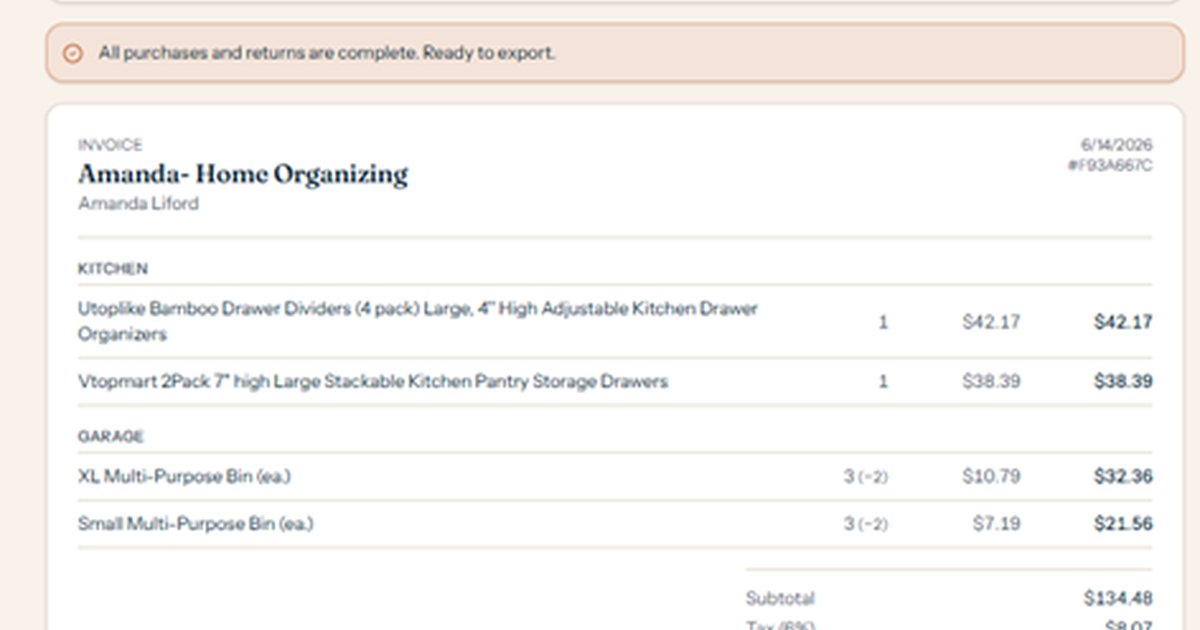
From tracked products to a clear client invoice.
Bring quantities, client pricing, and room-by-room details into one invoice. Add your business branding and export a PDF for your client.
- Product planning and budget tracking
- Purchase, delivery, and return records
- Markup and tax calculations
- Client-facing PDF exports
A fit for product-heavy organizing projects.
Cart to Client is for professional organizers who source products, keep purchase records, manage leftovers and returns, and invoice clients for those items. Client selection links and on-site job links also help keep decisions and install-day updates connected to the project.
Bring a real project to your demo. Amanda can show you the product plan, explain the team workflow, and walk through the invoice your client will receive.
Try it with your next project.
Basic is $29/month or $290/year. Pro is $39/month or $390/year. Annual billing is about two months free.
Every plan includes a 14-day free trial. No card is required to sign up.